Manual: Maps
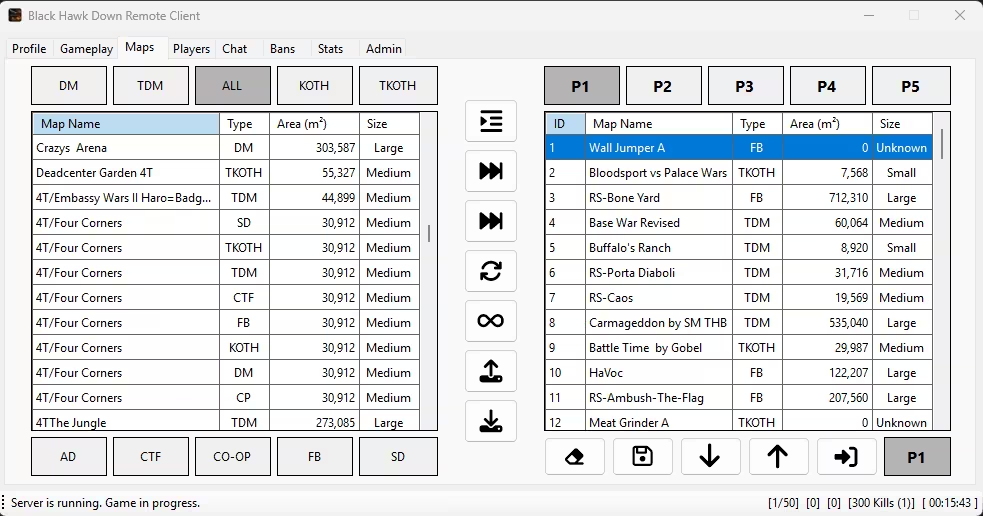
Map Tabs
Features of the Maps Tab
- Reports Square Area of Maps
- Multiple In-panel Playlists
- Randomize Maps
- Import Legacy Babstats Playlists
Map Size Calculations
HawkSync calculates map sizes based on square meters using data extracted from map files.
Size Calculation
Maps store coordinates during the loading process:
| Field | Description |
|---|---|
| MinX | Minimum X coordinate |
| MaxX | Maximum X coordinate |
| MinY | Minimum Y coordinate |
| MaxY | Maximum Y coordinate |
The Map Squared Area is calculated as:
Area (m^2) = (MaxX - MinX) x (MaxY - MinY)This represents the total area of the map in square meters.
Size Tier Classification
Maps are classified into tiers based on their area:
| Tier | Area Range | Description |
|---|---|---|
| Unknown | <= 0 m^2 | No valid data |
| Small | 1 - 10,000 m^2 | Small maps (< 1 hectare) |
| Medium | 10,001 - 100,000 m^2 | Medium maps (1-10 hectares) |
| Large | 100,001 - 1,000,000 m^2 | Large maps (10-100 hectares) |
| Extra Large | > 1,000,000 m^2 | Extra large maps (> 100 hectares) |
Display in UI
The Maps tab displays these values in the available maps grid:
- Area (m^2) - The calculated square meter area
- Size - The size tier classification
Hovering over a map in the grid shows a tooltip with full metadata including MinX, MaxX, MinY, MaxY, Area, and Size Tier.
Multiple In-panel Playlists
Compared to Babstats v3.5, administrators can now stage up to five (5) different playlists.
A playlist can be made active by selecting the Update Map Rotation button:

When selected, this will:
- Save the selected playlist
- Set it as the active playlist
- Restart the rotation from the top of that list
If you plan to stage a playlist in advance, simply select a different playlist tab and make your desired changes. Press Save to store the updated list. This will not impact the currently active playlist or the maps currently being played.
Note: The Play Next, Skip, and Score buttons are automatically disabled when viewing a playlist that is not actively being used by the game server. These controls are only available for the playlist currently in rotation.
Randomize Maps
The infinite loop button will randomize the maps. I can't recall if the Babstats v3.5 had this feature.
Import Legacy Babstats Playlists
To make the transition to HawkSync easier, exported playlists from Babstats v3.5 as well as exported playlists from HawkSync can be imported directly.